Top 5 Hearing Aids for Working Professionals: Best for Meetings, Calls & Zoom
Medically reviewed by Krishna Jain, Audiologist · November 18, 2026
Quick Answer
You’re in a client meeting. Three people are talking, the AC is humming, and someone on the speakerphone just asked you a question you only half heard. You nod, smile and hope it wasn’t a yes-or-no question.
For working professionals with hearing loss, this happens every day: in meetings, on phone calls and on Zoom, Teams and Google Meet. Many people wait 7 to 10 years before getting a hearing aid, often because they worry it will look “old” or hurt their image at work. Meanwhile, the strain of guessing words all day leaves them exhausted by evening.
Modern hearing aids are very different. They’re small, rechargeable and stylish, and they connect to your phone and laptop like wireless earbuds. Calls and video meetings stream straight into your ears, and AI processing helps you follow the speaker even in a noisy conference room.
In this guide, our audiologists at Hearwave pick the top 5 hearing aids for working professionals in 2026: the best for meetings, phone calls and Zoom, across different budgets.
Quick comparison: Top 5 hearing aids for working professionals
| # | Hearing aid | Price per ear (Hearwave) | Best for | Calls & video meetings |
|---|---|---|---|---|
| 1 | Signia Pure Charge&Go 5IX | ₹1,85,000 | Group meetings | Hands-free with iPhone & LE Audio Android |
| 2 | Phonak Audéo Infinio | ₹80,000 – ₹2,00,000 | Calls & Zoom on any device | Hands-free with almost any Bluetooth phone or laptop |
| 3 | Oticon Real | ₹1,95,000 | Long workdays, less fatigue | Hands-free with iPhone, iPad & Mac |
| 4 | ReSound Nexia | ₹1,65,000 | Conferences & long battery | Hands-free with iPhone & compatible Android; Auracast |
| 5 | Phonak Audéo Lumity 30 | ₹70,000 | Young professionals on a budget | Hands-free with almost any Bluetooth phone |
Prices are per ear, inclusive of taxes, as listed on hearwave.in See the full hearing aid price list.
Why hearing loss is harder at work
Hearing loss doesn’t just make sounds quieter. It makes speech less clear, and the workplace is full of situations that make that worse:
- Group meetings. Several people talk, interrupt and turn their heads. By the time you find who is speaking, you’ve missed the first half of the sentence.
- Conference rooms and open offices. Glass walls, AC noise, keyboards and chatter from the next desk all mix with speech.
- Phone and speakerphone calls. Calls are compressed and you can’t lip-read, so the soft consonants (s, f, th, sh) disappear first.
- Zoom, Teams and Google Meet. Laptop speakers are small, internet audio drops, and people talk over each other. Wearing headphones over hearing aids is uncomfortable and often causes whistling.
- Listening fatigue. When your brain works hard to fill in missing words all day, you finish the day drained, even if you “managed” every meeting.
Untreated hearing loss at work can lead to misunderstandings, missed details and avoiding calls or speaking up. A well-fitted hearing aid helps you stay sharp and confident. If you’re not sure whether you have hearing loss, read our 10 warning signs of hearing loss and book a free hearing test.
What working professionals should look for in a hearing aid
- Speech in noise. AI or advanced directional processing that focuses on the person speaking and reduces background noise. This matters most for meetings.
- Hands-free calling. The caller streams into your ears and the hearing aid microphones pick up your voice, so you don’t need to hold the phone.
- Laptop and multi-device connection. You’ll want calls from your phone and Zoom or Teams from your laptop. Check that the hearing aid pairs with both and switches easily.
- Rechargeable battery. A long workday with calls and video meetings uses a lot of power. Rechargeable models last the full day. Compare rechargeable vs battery hearing aids.
- Discreet design. Small receiver-in-canal (RIC) models in skin or hair colours are barely noticeable. For complete invisibility, see invisible hearing aids.
- App control. Change volume or switch to a “meeting” program from your phone, quietly, without touching your ears.
1. Signia Pure Charge&Go 5IX: Best for group meetings
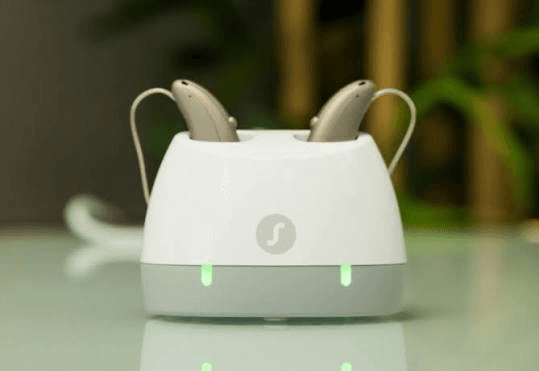
If your day is full of meetings, the Signia IX platform is built for you. It was designed for one problem: following a conversation when several people talk at once and move around, like a team discussion or a client lunch. Its AI processing tracks the voices around you and keeps them in focus as speakers change.
For meetings: 48 channels of processing, directional microphones and noise reduction help you follow the person speaking across a conference table.
For calls and video meetings: Bluetooth LE streaming with hands-free calls on iPhone and Android phones that support Bluetooth LE Audio. Older Android phones may stream audio but not hands-free calls; Signia’s StreamLine Mic accessory solves that.
Best for: managers, consultants, sales teams and anyone who spends most of the day in meetings.
Compare it with Phonak in Signia IX vs Phonak Infinio and see all Signia hearing aids.
2. Phonak Audéo Infinio: Best for calls and Zoom on any device
Most offices in India mix devices: an Android work phone, a personal iPhone, a Windows laptop. Phonak’s universal Bluetooth works with almost any device that supports Bluetooth hands-free calling, so your hearing aids act like a wireless headset for your phone and your laptop.
For calls and Zoom: take phone calls hands-free, then join a Teams or Google Meet call from your laptop with the sound going straight into both ears. No headphones over your hearing aids, no whistling.
For meetings: pair it with the Phonak Partner Mic (₹22,000 at Hearwave). Place it on the conference table or clip it on the presenter, and their voice streams directly to your hearing aids, even from across the room.
Best for: professionals who switch between phone and laptop all day, IT and remote workers, and people with Android work phones.
Compare the range in Phonak Infinio vs Lumity and the Phonak price guide. Browse Phonak hearing aids.
3. Oticon Real: Best for long workdays and less listening fatigue
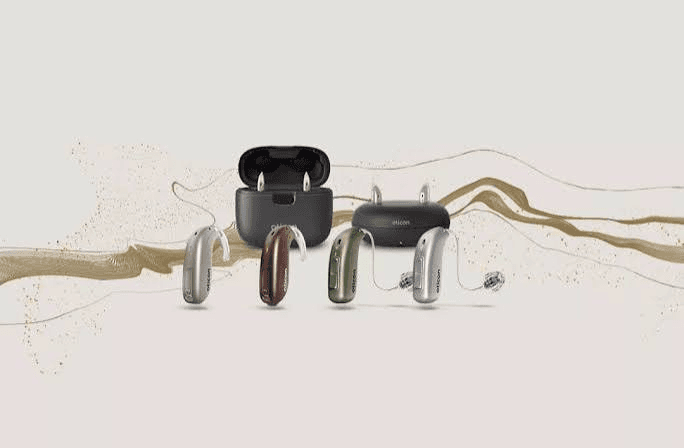
Oticon’s BrainHearing approach gives your brain the full sound scene in a balanced way instead of shutting out everything except speech. Many users say this feels more natural and less tiring over a long day. Oticon Real also softens sudden loud sounds (a chair scraping, a door slamming, a cup on a glass table) so they don’t jolt you mid-meeting.
Not sure which hearing aid suits your hearing loss?
Free audiologist consultation at our clinics in Noida, Delhi, Gurugram and Kolkata.
For calls and video meetings: two-way hands-free calls with iPhone, iPad and Mac, which makes it a strong fit for professionals in the Apple ecosystem. Android phones can stream audio directly; hands-free calling on Android needs Oticon’s ConnectClip accessory.
Best for: lawyers, doctors, teachers and anyone who listens closely for 8+ hours a day, especially iPhone and Mac users.
See the Oticon price guide and Oticon hearing aids.
4. ReSound Nexia: Best for conferences and all-day battery
ReSound Nexia supports Bluetooth LE Audio and Auracast, the new broadcast standard for streaming sound. As more auditoriums, conference venues, airports and offices add Auracast, you’ll be able to tune directly into the speaker’s microphone, much like picking a Wi-Fi network.
For calls: hands-free calls with iPhone and compatible Android phones.
For long days: up to 30 hours of battery per charge, so early flights, full workdays and evening events are covered. It’s also IP68 rated and includes tinnitus sound therapy, which helps if ringing in the ears bothers you in quiet offices (see our tinnitus treatment guide).
Best for: frequent travellers, people who attend conferences and seminars, and anyone who wants future-ready Bluetooth at a lower price than Signia or Oticon. Browse ReSound hearing aids.
5. Phonak Audéo Lumity 30: Best budget pick for young professionals
Early in your career and watching your budget? The Phonak Audéo Lumity 30 gives you the same universal Bluetooth as Phonak’s premium models: hands-free calls on almost any phone, plus streaming from your laptop for video calls.
It has 12 processing channels, a built-in rechargeable battery, IP68 water and dust protection, tinnitus masking and a 2-year official warranty. It works best for mild to moderate hearing loss and quieter office settings. If your meetings are large and noisy, a higher level (Lumity 50/70 or Infinio) will help more.
Best for: young professionals, first-time users and anyone who wants reliable calls and video meetings without spending ₹1.5 lakh or more. See more options in best hearing aids under ₹1 lakh.
Honourable mentions
- Signia Styletto AX, ₹1,55,000. A slim, modern design that looks more like a tech accessory than a hearing aid. A good fit if appearance matters to you in client-facing roles.
- Phonak Virto I70-10 NW CIC, ₹1,80,000. Custom-made and practically invisible. Note that this “NW” model is non-wireless, so it won’t stream calls or Zoom. Choose it only if invisibility matters more than streaming. Learn more in our invisible CIC hearing aids guide.
How to use your hearing aids for Zoom, Teams and Google Meet
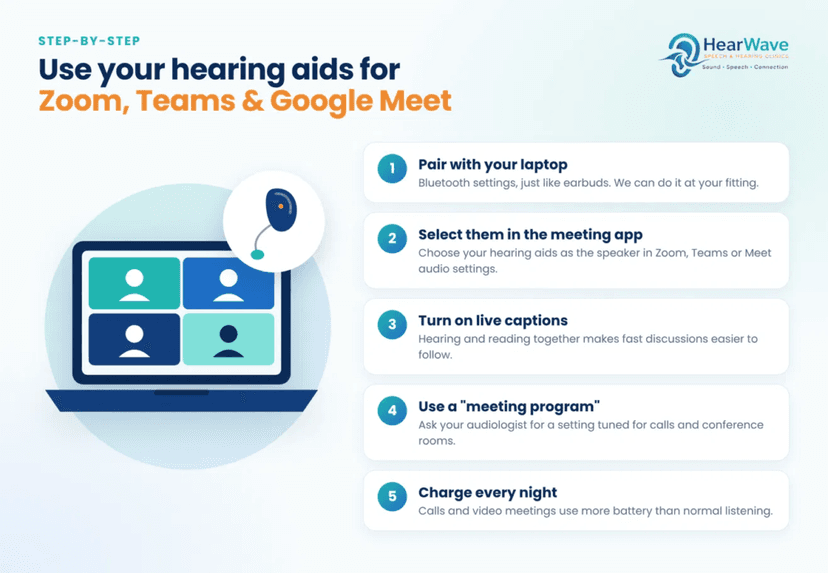
- Pair your hearing aids with your laptop in Bluetooth settings, the same way you’d pair earbuds. Your audiologist can do this at your fitting.
- Pick them in the meeting app. In Zoom, Teams or Meet, open audio settings and choose your hearing aids as the speaker. If your model supports two-way calling with your laptop, choose them as the microphone too; otherwise keep the laptop mic.
- Turn on live captions. Zoom, Teams and Google Meet all offer captions. Hearing and reading the words makes fast discussions much easier to follow.
- Ask for a “meeting program”. Your audiologist can create a setting tuned for conference rooms or video calls that you switch to from the app.
- Charge every night. A day of calls and video meetings uses more battery than normal listening.
Practical tips for meetings at work
- Sit with your back to the window and facing most people, so faces are well lit for lip-reading.
- Take a seat near the middle of the table, not at the far end.
- Use a remote or partner microphone for large meetings or presentations.
- Ask for agendas and minutes so you know the topic in advance and can check details afterwards.
- Tell close colleagues. A simple “I hear better when you face me” usually gets a positive response, and most people never notice the hearing aid anyway.
Which one should you choose?
| If you… | Choose |
|---|---|
| Spend most of your day in group meetings | Signia Pure Charge&Go 5IX |
| Switch between phone and laptop, or use Android | Phonak Audéo Infinio |
| Listen closely all day and use iPhone or Mac | Oticon Real |
| Travel a lot or attend conferences | ReSound Nexia |
| Want the best value | Phonak Audéo Lumity 30 |
Still comparing? Read Which hearing aid is best for me?, our top 10 hearing aid brands in India, or Top 5 hearing aids under ₹2 lakh. If calls and TV at home matter too, see Top 5 hearing aids for watching TV & phone calls.
Frequently asked questions

Which hearing aid is best for working professionals in India? For most office professionals, the Signia Pure Charge&Go 5IX is the best all-rounder for group meetings. If you take many calls on different devices, choose Phonak Audéo Infinio. For iPhone and Mac users, Oticon Real is an excellent choice.
Can I use hearing aids for Zoom and Teams calls? Yes. Bluetooth hearing aids pair with your laptop or phone, and Zoom, Teams and Google Meet audio streams straight into your ears. Many models also support hands-free calling, so the hearing aid microphones pick up your voice.
Will people at work notice my hearing aid? Rarely. Modern RIC hearing aids are very small and come in skin and hair colours. Custom invisible models sit fully inside the ear canal, though most of those don’t support Bluetooth streaming.
Do I need a hearing aid if I only struggle in meetings? Often, yes. Difficulty following group conversations is one of the earliest signs of hearing loss. A hearing test will show whether a hearing aid would help.
Can I wear headphones over my hearing aids for calls? It’s possible, but it often causes whistling and discomfort. Streaming directly to your hearing aids is clearer and more comfortable.
Will the battery last a full workday? Yes. Rechargeable models like the ones in this list are designed to last a full day, including calls and streaming. Follow our hearing aid maintenance tips to keep the battery healthy.
Can I buy on EMI or claim reimbursement? Yes. See hearing aids on EMI in India. Central government employees can also check CGHS hearing aid reimbursement, and others can see are hearing aids covered by insurance in India?
Try them at work, free, with Hearwave
The best way to choose is to test a hearing aid in your real workday: in your meetings, on your calls and on your laptop. At Hearwave, we pair the hearing aids with your phone and laptop and let you try them before you buy.
- Book your free hearing test & home trial
- Visit a clinic: Delhi · Noida · Gurgaon · Kolkata · All clinics
- Download the full price list · Contact our audiologists